
Reviewed 2026-09-21. Independent guide based on linked HighLevel documentation.
Start with your use case
| You need to… | Explore | Check first |
|---|---|---|
| Respond to incoming messages | Conversation AI | Supported channels, knowledge, booking setup, and human handoff. |
| Handle a phone inquiry and book a time | Voice AI | Calendar configuration and phone charges alongside AI usage. |
| Draft or refine an automation in chat | Ask AI | Review the draft in Workflow Builder; test before publishing. |
| Evaluate a lead inside an automation | Managed Agents in Workflows | Available runs, input data, outputs, and exception handling. |
| Build an app or custom web tool | AI Studio | Labs access and availability of the specific app capability. |
| Design a custom AI agent | Agent Studio | A separate product from AI Studio; pay-per-use charges apply. |
Official feature overview · AI product and billing reference.
Recent changes worth understanding
Released
Ask AI → Workflows
Describe an automation, inspect its draft, and refine it in chat. Open the builder to test and publish.
A faster starting point for your lead follow-up sequence.
September 18, 2026 · Official sourceReleased
Managed Agents in Workflows
Pass contact details or attachments to a managed agent and use its response in later workflow steps.
Assess an inquiry, prepare a lead brief, or route work to the right team.
September 18, 2026 · Official source$20 per eligible agency user / month
AI Agency Assistant
Ask AI and AI Studio access follows enrolled agency users across client accounts. Requires Unlimited or Pro; rolling usage limits apply.
Give account managers one assistant subscription across the locations they manage.
Reviewed September 28, 2026 · Official sourceFull-stack capabilities announced in private beta
AI Studio full-stack apps
The release adds server-rendered pages, server functions, and secure storage for API secrets. AI Studio itself is available through Labs; confirm access to the specific capability.
Explore custom web tools when a standard page or funnel is not enough.
September 4, 2026 announcement · Official source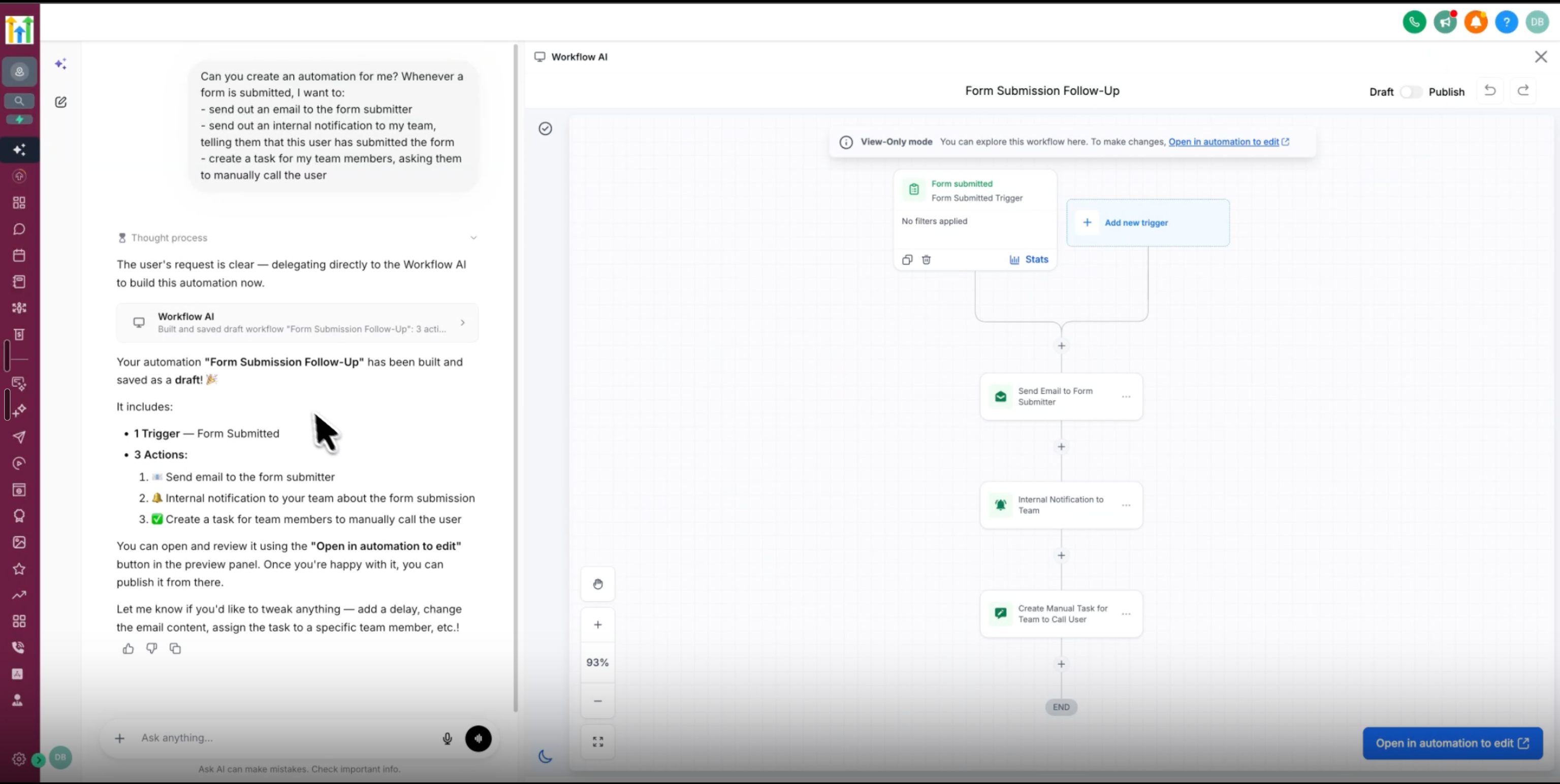
Keep the billing units separate
AI Employee Growth costs $50 per enabled location each month; Unlimited costs $97. Both have product-specific inclusions. Agent Studio usage and phone charges can still be separate. Check current AI inclusions.
The AI Agency Assistant plan costs $20 per eligible agency user each month on Unlimited or Pro. It covers Ask AI and AI Studio across that person’s accessible locations. Sub-account users are ineligible. Rolling limits apply; optional Extra Usage adds charges. Assistant eligibility and limits.
Use the calculator’s separate location and agency-user fields for subscriptions you actually intend to buy. Enter any extra usage once in the usage budget. Build the full usage budget.
A five-client AI budget example
These are hypothetical subscription subtotals using the linked rates, not a complete bill. For an agency with five client locations, choose location AI only where you need it; agency assistant seats follow eligible staff members.
| Example | Monthly subscription subtotal |
|---|---|
| Unlimited base plan + Growth AI in one location | $297 + $50 = $347 |
| Unlimited + Growth AI in all five locations | $297 + 5 × $50 = $547 |
| Unlimited + two AI Agency Assistant seats, no fixed location AI subscription | $297 + 2 × $20 = $337 |
These options serve different needs. They exclude communication usage, separately charged AI activity, other add-ons, retained tools, taxes, and setup. Check overlapping inclusions before combining subscriptions. Compare base-plan requirements, then use your actual choices in the full-cost calculator.
Make the first test small
Use one lead source, one calendar, and a few controlled test records. Verify the response, appointment, handoff, and bill before adding more locations. See the lead-to-appointment walkthrough.
Paid link: we may earn a commission. Check the current trial terms, included features, usage charges, and billing date before signing up.